RL-Based Email
Triage Agent
An intelligent agent that learns to optimize email triage decisions using a Markov Decision Process. It balances urgency, sender trust, temporal context, and cognitive workload to decide when to reply, delay, flag, or archive — trained over 1 million episodes.
Overview
Why I Built This
Every professional drowns in emails. We all know the feeling — 40 unread messages, and you're mentally triaging them: "this one needs an answer now, that one can wait, this one should be flagged for later." We do this instinctively, weighing who sent it, how urgent the subject sounds, how long it's been sitting there, and whether we're already overloaded with tasks.
I wanted to build a system that does this automatically — not with rigid "if-then" rules, but with an agent that learns the optimal strategy by interacting with a simulated inbox. The agent trains over 1 million episodes using Q-Learning with a Double Deep Q-Network (DQN) backend in PyTorch, converging on a policy that balances responsiveness with cognitive load management.
Live Inference — Auto Mode (NLP-Driven Decision)
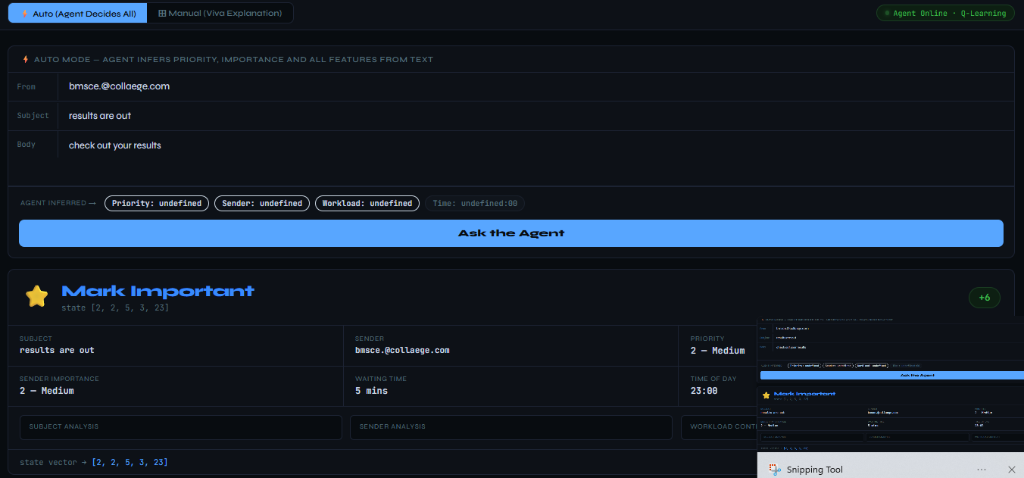
The user inputs a college email about exam results. The NLP pipeline extracts context features, constructs the state vector, and the trained Q-table maps it to Mark Important — the optimal action, earning a +6 reward.
The Problem
Why Static Filters Fail
Traditional email clients rely on simple heuristic rules — "if sender is boss, flag it." These static rule sets have fundamental engineering limitations that make them unsuitable for real-world inbox management:
No Utility Optimization
Rule-based systems treat every event independently. They lack a long-term utility function that balances inbox cleanliness with response-time urgency across a full session.
Temporal Decay Blindness
Static rules don't understand waiting times. An email that was low-priority 2 hours ago might now be critical — but heuristic filters can't model this temporal shift.
Workload Inelasticity
When user workload is heavy, only critical emails should get immediate attention. When it's light, medium tasks should be cleared proactively. Rules can't adapt to this.
The RL Solution
Formulate email triage as a Markov Decision Process. Train an agent to learn the optimal policy — when to reply, when to delay, when to flag, and when to archive — by maximizing cumulative reward over millions of simulated inbox interactions.
Agent Architecture
The MDP Formulation
To implement Q-learning, the email triage environment was formalized as a 5-dimensional continuous state vector mapping to 4 discrete actions. Every incoming email is converted into a state observation that the agent uses to select the optimal triage action.
State Vector S = [p, s, w, l, t]
Action Space A ∈ {0, 1, 2, 3}
Prompts user to reply immediately or triggers an automated quick response.
Queues the email in the task list for a later, less-loaded time window.
Flags the email, moves it to priority view, and triggers a system alert.
Clears from active inbox, marking it as handled without user intervention.
Contextual Decision — Friend Domain, Medium Priority
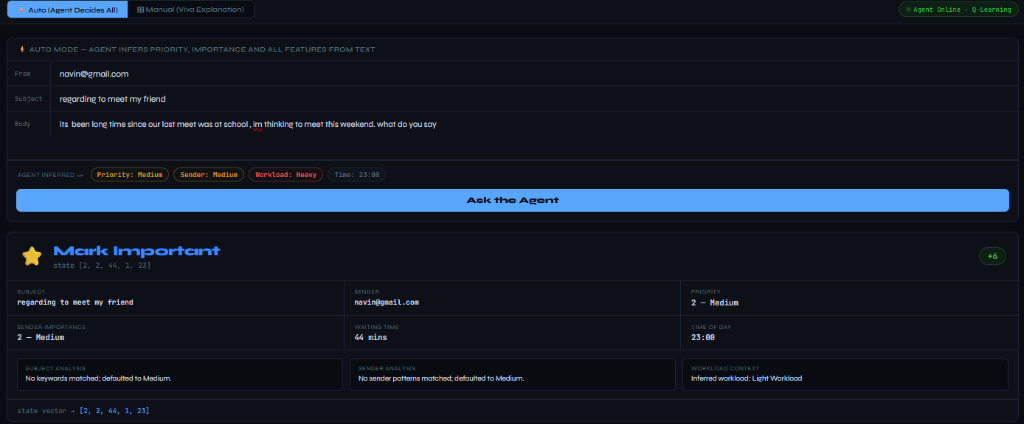
An email from a friend domain about a weekend meeting. The agent infers medium priority and domain trust. With 44 minutes of waiting time, the policy maps this to Mark Important (+6 reward) to ensure the user notices the personal email without disrupting active focus.
Incentive Design
The Reward Function
The reward function is the core of the agent's learning signal. It dictates which actions are optimal for each priority level, creating a precise incentive structure that the Q-learning algorithm converges toward over 1 million training episodes.
| Priority Level | reply_now | delay_reply | mark_important | archive |
|---|---|---|---|---|
| 🔴 High (P3) — Critical emails | +10.0 | −5.0 | +3.0 | −8.0 |
| 🟡 Medium (P2) — Task emails | −3.0 | +2.0 | +6.0 | −2.0 |
| 🟢 Low (P1) — Newsletters, noise | −3.0 | +1.0 | −1.0 | +5.0 |
★ marks the optimal action per priority level. The agent converges toward these over training.
Workload-Aware Decision — Heavy Load, Low Priority
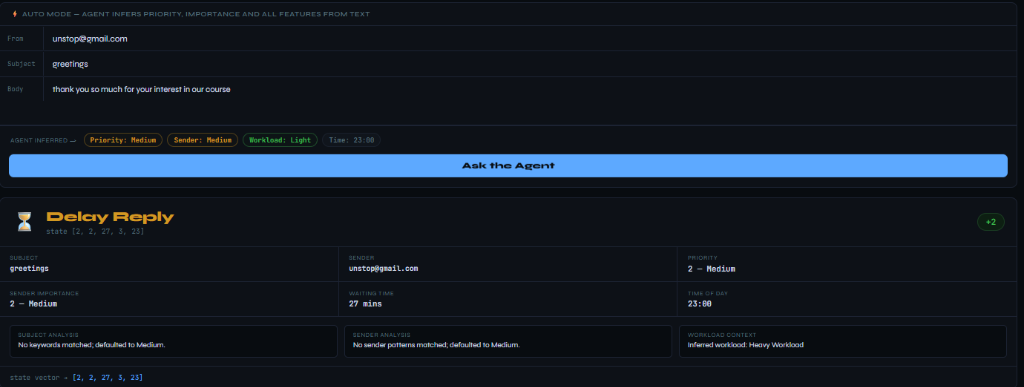
A generic "greetings" email arrives during a heavy workload period. The agent selects Delay Reply (+2 reward) to protect the user's active focus — demonstrating context-sensitive temporal reasoning over static rules.
Performance
Training Convergence & Results
The agent was trained using tabular Q-learning over 1,000,000 simulated email episodes. The exploration rate (ε) decayed from 1.0 to a terminal exploitation threshold of 0.01, allowing the agent to progressively shift from random exploration to greedy policy execution.
Training Progression — Reward vs Episode (1M Episodes)
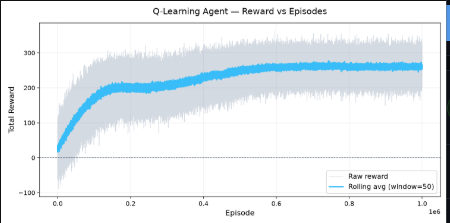
The reward curve converges steadily to optimal performance. The rolling average climbs from ~0 to +261.44 as the exploration rate decays and the agent exploits its learned Q-values.
Interactive Dashboard
Flask Web UI — Dual Mode Control Center
The companion dashboard built with Flask and Vanilla JS supports two execution modes for live demonstration and model introspection:
NLP-Driven Inference
Accepts raw email text (sender, subject, body). A term-density keyword parser extracts features, constructs the 5D state vector automatically, and calls the Q-learning policy for a decision.
Override Sliders
Manually adjust all 5 state dimensions with interactive sliders to demonstrate exactly how the agent shifts behavior as workload increases, waiting time changes, or sender trust varies.
Manual Override — Feature Adjustment for Viva Demonstrations
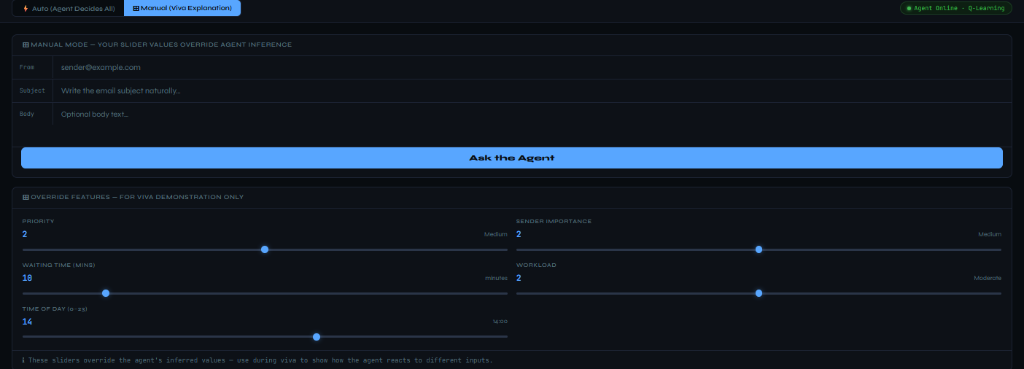
Presenters can manually adjust Priority, Sender Importance, Waiting Time, Workload, and Time of Day to demonstrate how the RL policy adapts dynamically as variables shift.
Session Telemetry — Real-Time Statistics & Decision History
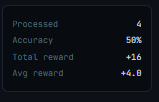

The Session Stats widget tracks processed emails, rolling accuracy, total rewards, and average reward per decision. The Decision History logs every triage action with the email subject and reward received.
Get Started
Run It Locally
# Create and activate virtual environment
python -m venv venv
.\venv\Scripts\activate

# Install dependencies
pip install -r requirements.txt

# Train the agent (1M episodes, saves Q-table + reward plot)
python main.py

# Launch the Flask dashboard
python ui/web_ui.py
Navigate to http://127.0.0.1:5000 in your browser to interact with the trained agent.
More Projects